HPandLoans.
Recording the purchase of farm equipment on hire purchase or with the use of a
loan is simple, but does require the setting up of an account to use as the source
of the funds and subsequent repayment. The bill for the equipment is thus entered
in the normal way, but paid using the loan account rather than the current bank
account. This ensures that you get the VAT back in the first instance and that the purchase
of the equipment is recorded. The HP or loan repayments are then
entered as 'transfers of funds' from the current bank account (or other bank account)
on a
monthly basis, these transactions not being liable for VAT. Any extra charges
relating to the HP or loan account can then be entered in a similar manner.
Step 1- Create a HP loan Account
From the main 'Farm' menu select 'Farm/Accounts and Enterprises/New Account' the new
account box is then displayed.

Enter an Account Name, try to give it a name that easily identifies the account,
enter a description and select the account type as 'Bank'.
DO NOT set an opening balance, we want to show the account as negative once we pay
the bill.
Step 2 - Enter the Bill
Enter the bill in the normal manner.

Step 3 - Pay the Bill using the HP loan account
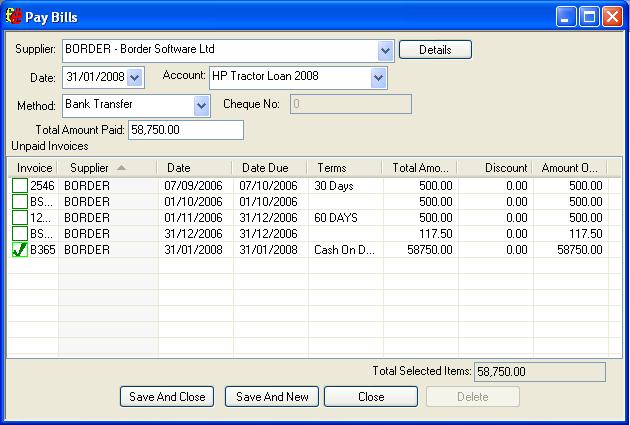
Pay the bill for the equipment in the normal manner but use the new HP Loan account
to pay the bill.
At this point the bill is paid and the VAT will appear in the VAT quarter. The HP
loan account will then be negative thus showing that you owe the money. Reconciling
this account will show this.
Step 4 - Monthly repayments
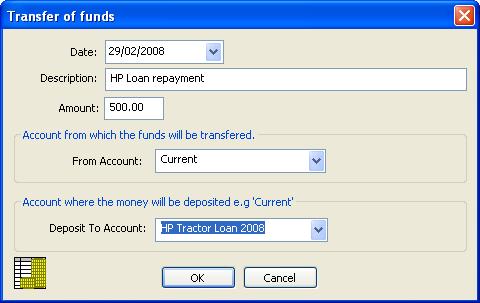
Enter the repayments by transferring funds from the current bank account, to the
HP Loan Account. To transfer funds, select the 'Transfer funds' option from the 'Banking'
menu.
Again, reconciling the account will show the balance....
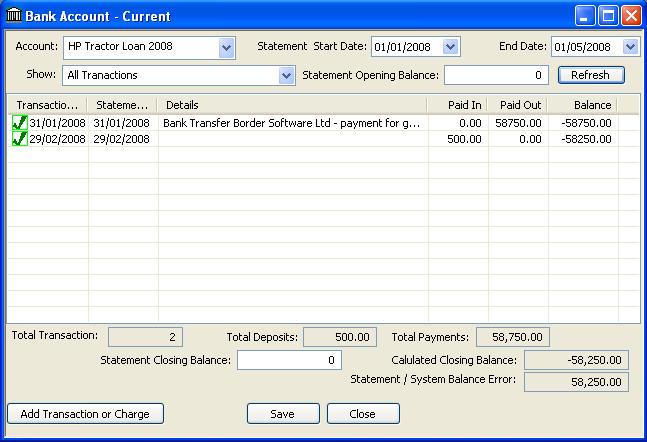
When reconciling the account, you may also add any additional charges, interest etc.